top of page


Project Overview
The National Audubon Society's Christmas Bird count takes place every year between December 14th and January 5th. Volunteer participants from all over the western hemisphere take part in this historical census by going out over a 24-hour period to count birds.
I designed this bird counting app as a Design Challenge for a job interview. I completed the entire design process - from research to high-fidelity prototype - over the course of 5 days.
Personal Project 2022
tools
Figma, Whimsical
my role
UX / UI Design, Branding
timeline
5 days

The Challenge
For the Design Challenge I was tasked with designing the following:
1. Design components to enable the collection of information needed for the bird count along your assigned route.
2. Design a visual summary that allows individuals to see and edit their counting results for different time frames.
Day 1: Project Planning
I began this design challenge by reviewing the project requirements and creating a project timeline to map out which tasks I needed to complete, and a schedule for completion to ensure I finished the Design Challenge by the due date.


Day 2: Research
With the project timeline complete, I set out to conduct research to understand the answers to the following questions:
What is the Christmas Bird Count?
Why does the Christmas Bird Count take place?
How does the Christmas Bird Count work?
Who participates in the Christmas Bird Count?
My research methods consisted primarily of reading materials and watching videos related to the Audubon Society, bird watching, and the Christmas Bird Count on the National Audubon Society's website, and conducting a competitive analysis of other bird watching apps.
What is the Christmas Bird Count?
Frank Chapman started the Christmas Bird Count as a way of promoting conservation by counting, rather than hunting, birds on Christmas Day of 1900. Some counts have been running every year since then!

Why does the Christmas Bird Count take place?
The census provides important information about the health of bird populations and how birds are faring over time, and is used to guide conservation efforts.
How does the Christmas Bird Count work?
Participants join in individual Counts that take place in a 15 mile radius. Below on the left is an image of all the count circles participants can join in the western hemisphere. On the right, an image of the Portland, Oregon count circle.

Counts are conducted in a 24 hour period on a single calendar day. Participants track bird species they see and hear, and track the number of birds per species. Below are images from the National Audubon Society website, showing how participants track their bird counting out in the field.
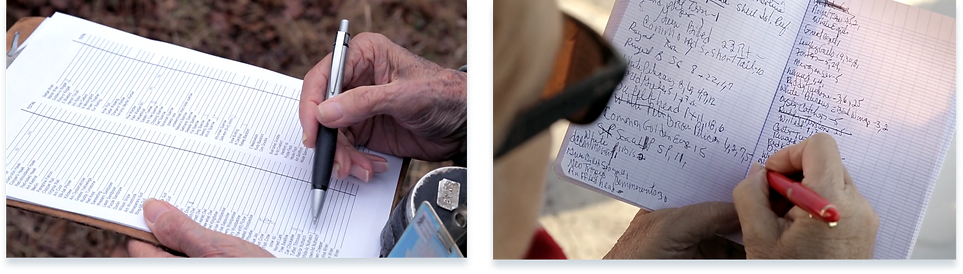
Who participates in the Christmas Bird Count?
I used the information I collected from watching videos of Christmas Bird Count participants out in the field to create a User Persona to help me understand the goals and pain points of a Christmas Bird Count app user.

After creating a User Persona to better understand the user's goals, I created a short list of important design goals for the app:
1. Meghan needs to quickly identify and record bird sightings out in the field - she needs to spend less time looking at the app and more time looking for birds!
2. Meghan needs a system to help her identify birds she doesn't know.
3. The app needs to help Meghan save as much time as possible by autofilling information such as Location, Time of Sighting, Miles Travelled, and provide a list of common birds to the area.
Day 3: User Flow + Sketches
On day 3 I started out by creating a User Flow to map out the tasks Meghan needed to complete, and all the interactions that would allow her to successfully navigate through the app.

Low-fidelity Sketches
After creating the User Flow which established all of the pages and user interactions necessary for the app, I began sketching. Sketching is a part of my process that allows me to rapidly iterate on many possible design solutions, and to begin to visualize the layout of each screen.

Day 4: Mid-fidelity Wireframes
After iterating on many possible design solutions through sketching, on Day 4 I set out to create Mid-Fidelity Wireframes of each screen of the app.

Day 5: High-fidelity Screens + Prototype
After creating all of the Mid-Fidelity Wireframes, on Day 5 I moved on to creating all of the High-Fidelity screens and High-Fidelity Prototype. But before I could begin the high-fidelity UI, I needed to make decisions about how the app should look and feel. To begin this process, I created a Mood Board by collecting images and color palettes that I felt would highlight the focus on birds and nature during early winter.

Next, I created a UI Kit where I made decisions about font, color, button styles, and icons.

High-fidelity Screens
First, I designed this Sign-Up flow in order to solve Meghan's goals of:
1. Joining a Count Circle
2. Getting paired with a more advanced Bird Watcher and
3. Automatically tracking information such as location of sighting, mode of transport, feeder or field

Next, in order to solve for Meghan's goal of tracking the time she spent watching birds, I creating a Timer at the top of the home screen.

I designed two solutions to help solve Meghan's goals of:
1. Quickly and accurately tracking the species and number of birds she saw
2. Quickly adding bird sightings while out in the field

In order to help Meghan identify what bird she saw, I included a filter system so that Meghan could use information like color, size, and habitat to identify birds in the field.

Finally, I designed a Visual Summary of Meghan's bird counting day that she could easily view and edit by Time or Location of sighting. This Visual Summary also allows Meghan to submit the data from her count to the circle organizer at the end of her bird counting day.

Prototype
After designing all the High-fidelity screens, I created a Prototype to test the following tasks with users:
1. Sign-Up Flow
2. Use Timer
3. Add a Bird Sighting with Quick Add
4. Use Filters to Identify a bird
5. View Visual Summary
6. View Bird Sightings by Time and Location
7. Submit Final Count results


Next Steps
If given more time, to go further with this project I would plan to conduct user interviews with real participants of the Christmas Bird Count to understand more about how they conduct their bird counts, and what challenges they face when out in the field and recording their results.
I would also like a chance to conduct usability testing to see how users interact with the app, and understand where design iterations need to be made based on user feedback.
bottom of page