

Project Overview
Personal Project 2021
In 2020 the iOS 14 update included a new feature for users to pin important conversations in Messages. Pinned conversations in iOS currently allows users to prominently display up to 9 conversations at the top of the messages app in the form of large, circular, dynamic icons.
Pinned conversations in iOS makes finding important conversations easy and fast for users, and the prominent display serves as a reminder to respond to messages.
tools
Figma, Miro
my role
UX / UI Designer
timeline
2 weeks
Problem Statement
Currently, there is no feature that allows users to pin individual text messages to a conversation. Users often waste time scrolling through text conversations to find important information such as the dates and times of events, links to products, and photographs.
Hypothesis
Adding a feature to iOS Messages that enables the ability to Pin individual messages to the top of a conversation would save users time and reduce frustrations surrounding looking through text conversations to find important information.
Research

Research Goals & Objectives
01
Understand user frustration and pain points around searching for information within a text thread
02
Learn what types of information users typically need to return to text conversations for
03
Understand if and why users enjoy the Pinned Conversation feature for iOS, and if they would want to Pin individual text messages
Market Research & Competitive Analysis
To gain a better understanding of how users' might utilize a pinned message feature across various platforms, I conducted a competitive analysis of other popular messaging apps including i0S, Google, Slack, and Facebook Messenger.
Findings:
-
iOS, Google, Slack, and Facebook Messenger all have Pinned Conversations
-
Instagram has a function to Pin top comments
-
Most apps allow between 3 and 9 pinned conversations
-
Slack is the only messaging app that has a function to Pin individual messages

User Interviews
After conducting a competitive analysis of other messaging apps, I conducted research in the form of 1:1 Interviews to speak with users directly about their experiences with using iOS for text messaging.
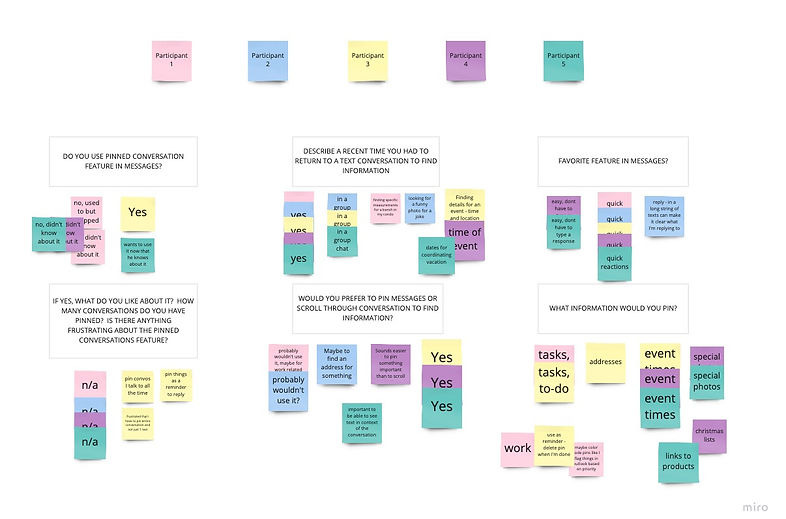
I conducted 5 remote user interviews via Zoom with iPhone users between the ages of 30-65. The questions I asked sought to gain insight into if and how users currently use pinning functionality in iOS, if they experience any frequent frustrations with iOS, and if they ever find themselves scrolling through old text conversations in search of information within a text thread.
All 5 users said that they had a recent experience of needing to scroll through text conversations in search of information they needed to find.
Information that users looked for in text threads included: Addresses, event times, work tasks to complete, links to products, and photographs.
User Interviews Affinity Map

Empathize
With the insights I gained from conducting 1:1 Interviews and a Competitive Analysis of similar messaging apps, I constructed a User Persona who shared similar pain points as those experienced by my research participants.
Jonny Crandall juggles a busy work schedule with to-do lists, emails and slack messages, along with maintaining an active social life. Along with his work messages, Jonny is also included in several ongoing text threads with family, friends, and coworkers. He struggles to stay on top of responding to all of these messages, and often finds himself needing to scroll through text threads in order to find information.
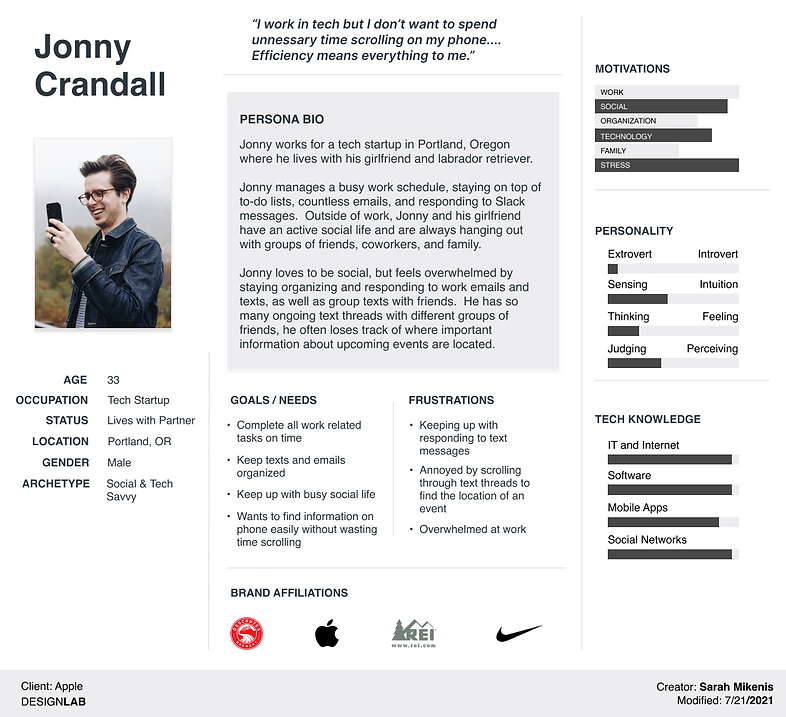
After understanding the goals and frustrations of a user like Jonny, I created a list of prioritized features to add to the iOS Messages app:
-
Must Haves
-
Ability to pin a message
-
Create a new pin
-
View a list of all pins
-
View pin in context of conversation
-
Edit Pin
-
Accept/Decline pin
-
Alert Icon to indicate text is pinned
-
-
Nice to Have
-
Set a reminder
-
React to pin
-
-
Can Come Later:
-
Color coded pins based on priority
-
Time controlled pins
-
With a prioritized list of features ready, I set about creating a User Flow to understand how a user like Jonny would interact with Adding a Pin feature in iOS Messages.
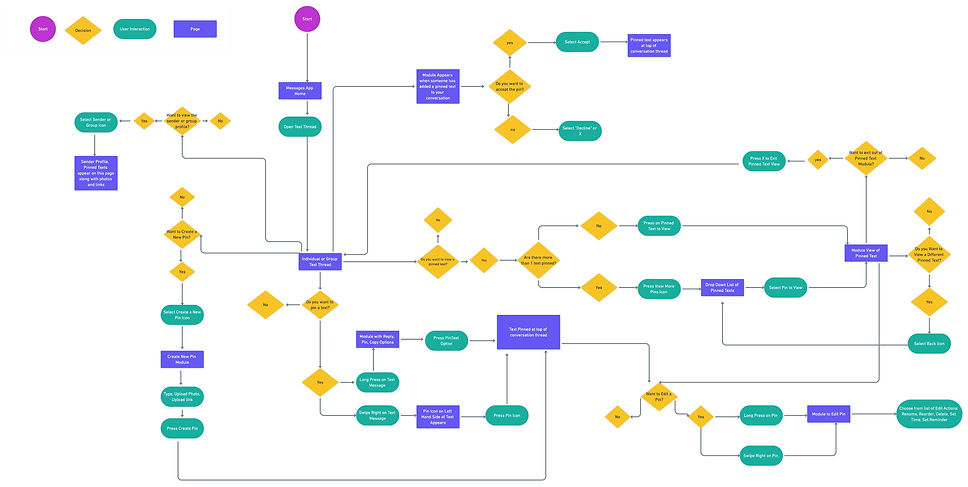
Using the feature roadmap and user flow as a guide, I began the process of sketching out the main screens.
I reflected on the needs and pain points of my user persona Jonny Crandall, and kept the following design goals in mind as I began to sketch:
-
The new integrated feature should alleviate the user wasting time scrolling through old text messages to look for information
-
The Pinning Feature should increase visibility of important text messages for the user
-
The new feature should fit seamlessly into the iOS conventions and style
Developing familiarity with all of the conventions and behaviors in iOS was a priority before I could even begin to sketch. I had to make sure I understood what functionality was available with a swipe left, swipe right, long press, and what a notification looked like in iOS so that I could accurately design a new feature that followed Apple's guidelines.


Design
Designing within Constraints
Designing a new feature for iOS Messages that didn't exist yet but fit seamlessly into Apple's product was a challenge. Below is an example of 5 design iterations I created to indicate that a text message has been pinned.
I ultimately chose Option 4 to include in the final design. In order to make a decision about which option worked well for the user and also fit iOS design conventions, I sought the advice of design peers. With more time to work on this project, I would like to test multiple options in an A/B test with users.

OPTION 4
OPTION 5
OPTION 3
OPTION 2
OPTION 1
High-Fidelity Wireframes


In order to test the usability of the new feature with users, I created a high-fidelity prototype using Figma, and planned to test the prototype with users who would be asked to complete the following tasks:
-
Task 1:
-
Pin the text from Gavin which reads "Planning to arrive some time between 8-12pm"
-
-
Task 2:
-
View the expanded list of Pinned text messages
-
-
Task 3:
-
Delete the Pin that reads "Planning to arrive,
-

Prototype & Test
Usability Test Results
I conducted remote usability testing via Zoom with 5 participants. The usability test results revealed the following:
-
100% of tasks were successfully completed by all test participants
-
1 participant asked if there would be an index of all Pins available to view
-
2 participants had questions/comments around if deleting a pin would delete the original text message as well
Design Iterations
To address the pain points experienced by users during the usability testing, I sought to make the following Design Iterations:
First, I wanted to address the confusion that 2 out of 5 participants experienced with Deleting a Pin. The users were confused if this action would also delete the original text messages, so I wanted to make a design change that would clarify the action of Deleting for the user,
I made changes to the language and changed "Delete" to "Delete Pin" in order to help clarify for the user what action was taking place.
BEFORE
AFTER


BEFORE
AFTER
The second design iteration I implemented was to add Pin icons to the Messages home screen to indicate that pinned messages are contained within that conversation.


Next Steps

01
Explore possible solutions for an Index of Pinned Messages in all conversations

02
Develop design for setting time limits for Pinned texts, as well as explore design solutions for color coding pins based on priority level