

Project Overview
The Colearn Journeys project was driven by a desire to help parents streamline their educational planning, offer radical flexibility compared to brick and mortar schools, personalize learning, and improve communication between parents and teachers. This case study delves into why we reimagined the Colearn platform’s core features, who the redesign was meant to serve, what functionality Journeys entails, and how we ended up with the final product.
Product Design for Colearn, 2023
Figma
tools
Lead Product Designer
my role
3 months
project timeline
Why Colearn Journeys?
The Colearn platform was originally designed with homeschooling parents in mind. It facilitated the discovery and organization of online learning resources, allowing parents to create customized learning plans for their children. However, as Colearn expanded to include a network of schools, including a public Charter School in Arizona, the platform's user base evolved to encompass families within the public school system, teachers, and school administrators. In response, features such as the "Homeroom Teacher" were introduced to address school-specific needs.
Despite these adaptations, the Colearn planner failed to fully cater to the needs of the school and parents. Parents found themselves constrained by the requirement to plan individual weekly blocks for each child, while teachers lacked insight into students' course selections and curriculum paths, and the Discover feature didn't accurately reflect the curriculum, courses, or course requirements that were a reality of being a part of Colearn Academy Arizona.
The Colearn Planner before Journeys


In the spring of 2023, recognizing the need for a transformative change, we made a significant overhaul to the Colearn app and began our work on Colearn Journeys.
Who are Colearn Journeys for?
In order to meet the changing needs of Colearn families, students, and teachers, The Planner and Discover features of the Colearn app were replaced with "Colearn Journeys" with the following objectives in mind:
Streamlined Planning: Colearn Journeys takes the guesswork out of yearly planning for parents by automatically generating a path that meets all state requirements, alleviating the burden of manual planning and guesswork regarding state requirements.
Radical Flexibility: Colearn Journeys empower parents with unparalleled flexibility in scheduling, allowing them to adapt the educational plan to their child's unique needs and interests, whether that involves studying fewer days per week, dedicating one day to each subject, or accommodating their child's passions.
Enhanced Teacher Visibility & Communication: With the coexistence of a public school and homeschooling environment, Colearn teachers lacked transparency regarding curriculum and resource usage by parents. Colearn Journeys was introduced to provide teachers with a clear view of curriculum, resources, and course selections, facilitating collaboration with Course Mentors (parents) and students. The existence of Journeys - where parents start a Journey and teachers approve and apply a Journey - fosters greater communication between parent and teacher.
Simplicity: Parents are no longer burdened with the task of creating individual study blocks each week for each student. Colearn Journeys generates an "ideal week" based on curriculum and course choices for the entire year.
What is a Colearn Journey?
A New Colearn Journey

Streamlined Planning
When parents initiate their Journey, the student name, grade, state, and school type are already retrieved through our new integration with Clever (a student information system), and the Subjects that are required, along with the required Hours per Subject, come pre-loaded. Within seconds, parents have a pre-made plan for their student to ensure that they are studying all the required subjects and minimum necessary hours per week to meet the state requirements by the end of the year.
By selecting a Curriculum Path parents inform their homeroom teacher whether they are using online Colearn-provided curriculum, their own Home Curriculum, or a combination. This distinction is crucial, as it relates to work sample documentation requirements for families using their home curriculum.
A Subject Routine before Customization
Radical Flexibility
Colearn Journeys empowers families with unparalleled flexibility to meet requirements on their terms.
A Journey will suggest an initial weekly allocation of required hours for subjects, such as one hour per day from Monday to Friday. Parents can then either use the pre-loaded schedule, or choose to effortlessly customize the schedule by adding or deleting hours on any day or shifting school days to the weekend.
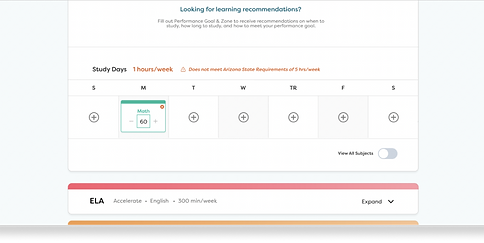
Parents can easily craft a unique schedule while ensuring compliance with requirements. The feature also provides real-time alerts if hours fall below or exceed requirements.

A Subject Routine after Customization

A Subject Routine that does not meet Requirements
Personalized Learning Recommendations

Personalization and Learning Guidance
Within each subject, parents can fine-tune the learning experience by selecting a Working Grade level, specify Performance Goals, and include information about their child's "Zone" based on interest and aptitude, and include any additional notes. This personalization encourages parents to think deeply about their child's interests and engagement with a subject, and share pertinent information with their teacher which will help guide curriculum and resource selections throughout the year.
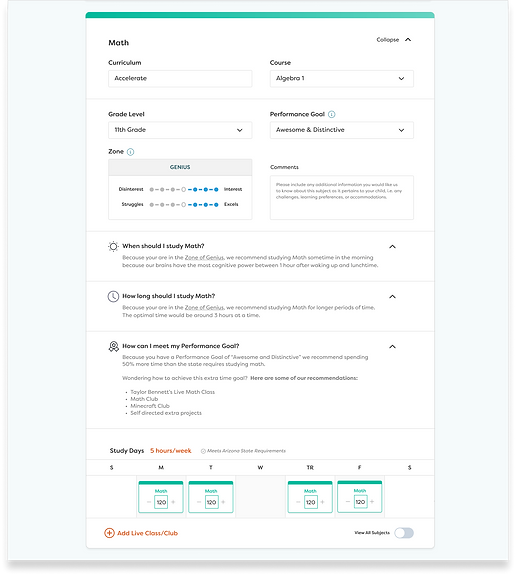
Leveraging the inputs on Zones and Performance Goals, Colearn Journeys offers personalized recommendations on when to study, how long to study, and strategies to achieve performance goals.
Journey Preview
Enhanced Visibility and Communication with Teachers
Colearn Journeys introduces a collaborative process where parents initiate a Journey for each learner, making selections to the best of their ability. Ideally, at the start of the school year, parents and teachers engage in a one-on-one discussion to review and refine the Journey together. A Journey remains pending until a teacher approves and activates it. This approach enhances teacher visibility into curriculum and course selections, promoting open communication between parents and teachers.
Pictured on the right is the Journey Preview screen, showing the Curriculum, Course, Zone, Performance Goal, and Working Grade Level selection for each subject, as well as a view of the students entire schedule for each week.


Watch a complete walk through of the Journeys feature here. I created this video to walk our Colearn teachers through the new product.
How did we arrive at Journeys?
As we began our work developing Colearn Journeys, a crucial first step was conducting 1:1 Interviews with teachers and the school counselor.
We met with our teachers several times during the design stage to make sure we understood how they work with students and course mentors (parents), what the beginning of the year was like for teachers and how they help families make curriculum and course selections, how they intervene if students are struggling, and to gather all the details we needed about school and state requirements for subjects, hours, and courses by grade level. We also gathered resources from the teachers, such as the personal spreadsheets they kept to keep track of their students and curriculum, to help us understand their current process and how to improve it.
Family Survey
One important insight we gained from talking to teachers was learning the value for them in learning some background information about a family before their initial 1:1 call together at the beginning of the school year. This background information helps teachers understand what the learning environment is like at home and aids what kind of curriculum path and curriculum the teacher helps the family select.
Because of these conversations we ended up developing a Family Survey that became part of the Parent Onboarding Process, and the Survey answers also lived in the Journey Builder and Journey Preview so that teachers had access to it.

Journey Workflow
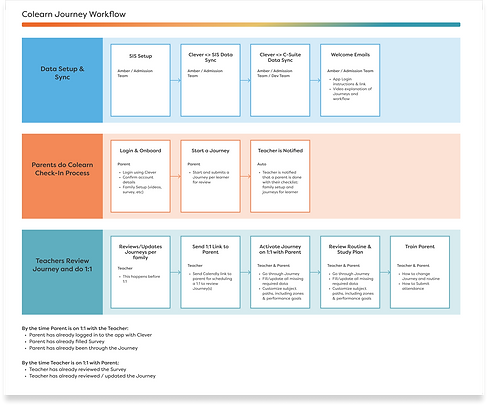
As we engaged in collaborative discussions with our teaching staff and continually refined our design concepts, the vision for Colearn Journeys took shape. We transformed our initial Figjam draft flows into a comprehensive workflow that garnered consensus within the Product Team. This refined design was then presented to the entire Colearn Team, ensuring that we collectively met the critical back-to-school deadline.
A Few Key Design Iterations
The process of designing and developing Colearn Journeys took approximately 3 months, during which our team was involved in extensive discussions and multiple design iterations. I can't show all of the iterations we went through in this case study, but will highlight a few important iterations here.
1. View Schedule for All Subjects
INITIAL DESIGN CONCEPT
This initial design concept began by trying to find a short hand method for visualizing the number of hours and days of study for all subjects so the user had the context of the rest of their schedule as they customized each subject.

FINAL DESIGN
For the final design we implemented a toggle button to "View All Subjects" that could be turned on or off for user to view the context of the full week. We also got rid of the circle and number in the initial concept and substituted a more information rich block with the subject title and number of minutes.

2. Customize Subject Hours
INITIAL DESIGN CONCEPT
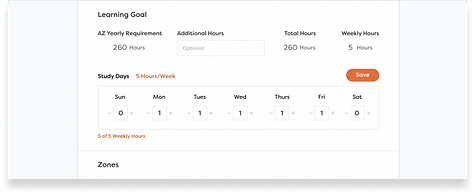
This initial design concept began by exploring how a user could customize the hours they studied a subject each day. We began with an idea that a user might see the base requirement for the state for the year, and choose to add additional hours for the whole year.
FINAL DESIGN
For the final design, we discarded the idea that users would want to add total additional hours for the year on top of the state requirement. Instead, if they added additional hours to their week, it would automatically add to their yearly total and a message would tell them if they were meeting, exceeding, or not meeting state requirements.

3. Learning Recommendations
INITIAL DESIGN CONCEPT
We knew that we wanted Zones and Performance Goal to have an impact on the subject schedule. We went through many design iterations imagining different options for turning on or turning off a recommendation that would actually change the schedule.


FINAL DESIGN
For the final design, we ultimately eliminated the idea of Zones and Performance Goals actually changing the schedule. We decided it would be best for parents to customize their schedule any way they wanted to. Instead, we came up with the idea of "Recommendations," that gave parents our recommendations for When to study, How Long to study, and how to meet their Performance Goal. This way, they could read the recommendation and customize their schedule accordingly.
What We Learned & Next Steps
We met our start-of-school deadline for the rollout of Colearn Journeys! After training teachers and watching them begin to create and approve journeys with our Colearn families, we looked at the data to understand more about our families and how Journeys were being utilizied.

I created a slide deck to present to the company that highlighted what we learned about our families and teachers from Journeys.
We found that many of our families were using the customization feature to create personalized learning routines that fit their needs.


We also discovered that 73% of subject paths included an additional comment, showing that parents felt involved and compelled to share information about their children with the teacher, which we thought was a big success of the feature!
Next Steps
To continue our work with Colearn Journeys, a few important next steps would be:
-
User Testing sessions with parents and teachers : We plan to conduct user testing sessions in order to ensure Journeys is meeting the needs of the school and Colearn families and identify any pain points.
-
Introduce Live Clubs and Classes : Live classes and clubs play a pivotal role in attracting families to Colearn Academy Arizona. Integrating these interactive elements into the Journeys schedule not only aids families in their planning but also introduces new avenues for students to actively pursue their learning and performance objectives throughout the year.
-
Goal Centered Planning : As we envision the future of Colearn Journeys, the next major development on our radar is the concept of goal-centric planning for students. Are you aspiring to attend college? Eager to secure an internship? Maybe you're dedicated to honing your skills in your Visual Art portfolio? Our aim is to harness the power of individual student goals to tailor their personalized learning journeys, be it for the academic year or a span of several years.